
Email was designed in an era when everyone on the network was assumed to be acting in good faith. Nothing in the original protocol stops me typing your address into the From: field and pressing send. That is not a bug being exploited. It is how email works, and it is why the three records below exist.
If your domain has none of them, someone can send invoices, password resets or requests for a bank transfer that appear to come from your business. Your customers have no way to tell. Setting this up is DNS work, it is free, and for most small businesses it takes about an hour.
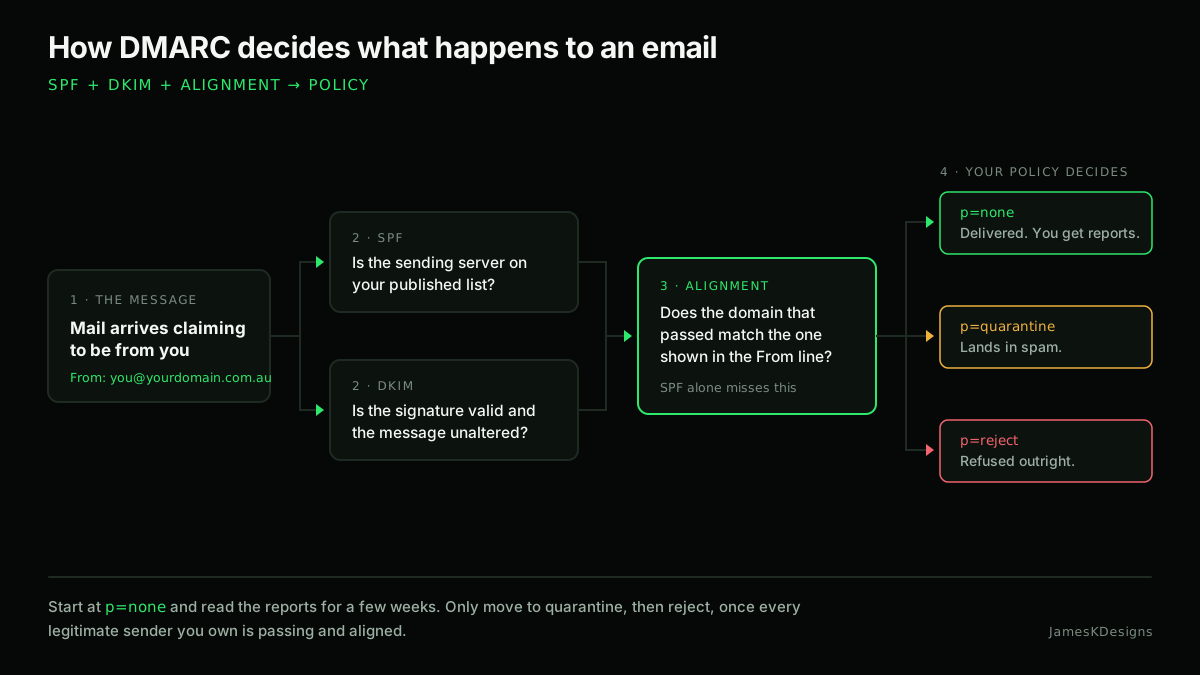
The three records, in plain terms
SPF: who is allowed to send
SPF is a published list of the servers permitted to send email using your domain. It is a single TXT record on the domain itself.
v=spf1 include:_spf.google.com include:spf.protection.outlook.com -all
Two things people get wrong here:
- You may only have one SPF record. Two TXT records both starting
v=spf1is a permanent fail, not a merge. Combine them into one line. - SPF allows ten DNS lookups. Every
include:counts, and includes can contain their own. Go over ten and the whole record errors out.
End with -all (hard fail) once you are confident the list is complete. ~all is a soft fail and is the safer place to start.
DKIM: a signature that proves nothing was altered
DKIM adds a cryptographic signature to every outgoing message. The private key lives with your mail provider; the public key goes in your DNS so receivers can check it.
You do not generate this by hand. Google Workspace, Microsoft 365, Fastmail and the rest all have a screen that produces the record for you, usually under a name like selector1._domainkey. Turn it on for every service that sends mail as you, not just your mailbox provider.
DMARC: the policy that ties them together
SPF and DKIM on their own tell a receiving server whether a check passed. They do not say what to do when it fails, and, importantly, they do not check that the domain being verified is the one the recipient actually sees in the From: line. DMARC does both. That second part is called alignment, and it is the whole reason DMARC matters.
It is a TXT record at _dmarc.yourdomain.com.au:
v=DMARC1; p=none; rua=mailto:dmarc@yourdomain.com.au; adkim=r; aspf=r
p: what receivers should do with mail that fails:none,quarantineorreject.rua: where aggregate reports are sent. This must be a fullmailto:address.adkim/aspf: alignment mode, relaxed (r) or strict (s). Relaxed is right for almost everyone.sp: an optional separate policy for subdomains. If you do not set it, subdomains inheritp.
Start at p=none. Always.
It is tempting to go straight to p=reject and be done with it. Do not. Almost every business sends legitimate mail from more services than it remembers: accounting software, a booking system, a mailing list tool, the contact form on the website, a CRM. Publish p=reject before you have found all of them and you will silently destroy mail you needed to send.
p=nonechanges nothing about delivery. It just asks receivers to tell you what they are seeing. That is exactly what you want first.
Leave it there for two to four weeks and read the aggregate reports. They arrive as XML, which is unreadable by hand, so use one of the free DMARC report viewers. What you are looking for is any source sending mail that passes as you but is not on your SPF list, or is not DKIM-signed.
Then tighten it
Once the reports show only sources you recognise, and all of them are aligned:
- Move to
p=quarantine. Failing mail lands in spam rather than the inbox. Watch for another couple of weeks. - Move to
p=reject. Failing mail is refused outright. This is the setting that actually stops someone spoofing your domain.
If you own domains you never send mail from (a parked variant, an old business name), publish p=reject on those immediately. There is no legitimate mail to break.
Mistakes I see regularly
- Two SPF records. Usually one from the old host and one from the new one. Fails everything.
- Setting
ruf. Forensic reports contain message content, most receivers will not send them, and it creates a privacy problem for no real benefit. Leave it off. - Forgetting the website. The contact form on your own site sends mail as your domain. If it goes out through the web server rather than an authenticated mailbox, it will fail DMARC.
- Stopping at
p=none. Monitoring mode protects nobody. It is a stage, not a destination, and a surprising number of domains have been parked there for years.
Checking what you have now
From any terminal:
dig +short TXT yourdomain.com.au
dig +short TXT _dmarc.yourdomain.com.au
The first should return exactly one line beginning v=spf1. The second should return a line beginning v=DMARC1. If either comes back empty, that is the gap.
Worth the hour
This is one of the few security jobs with no ongoing cost, no software to install and no performance impact, and it protects your customers as much as it protects you. Alongside it, the website security basics cover the other side of the same problem.