
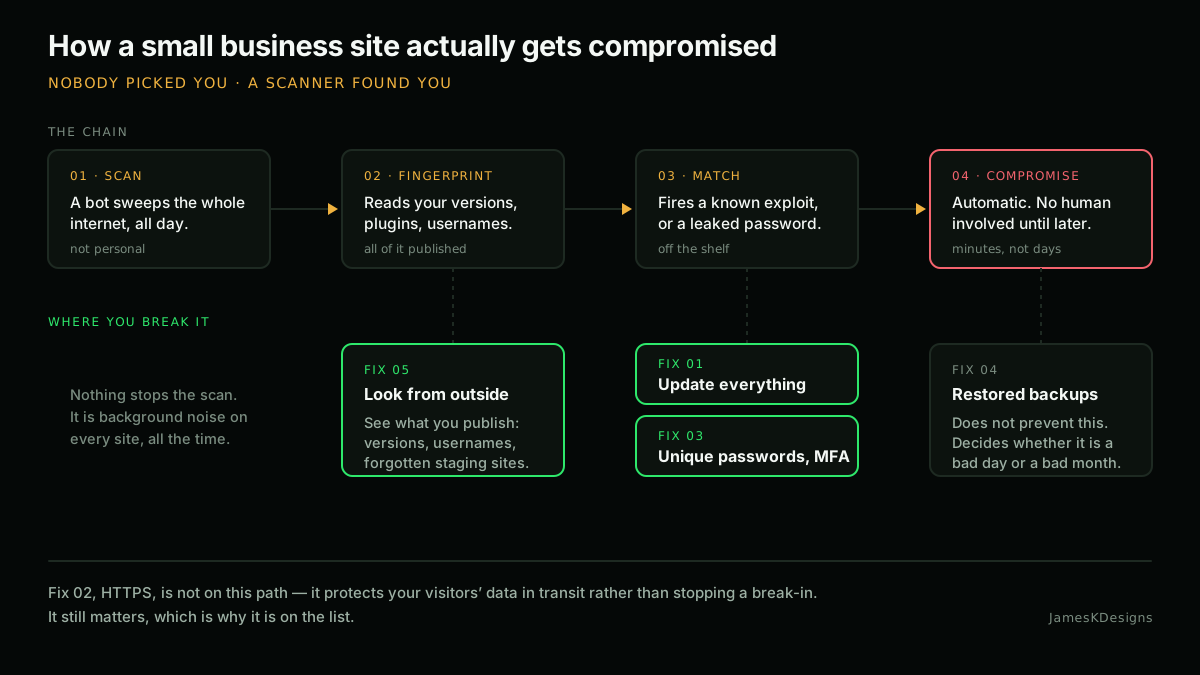
Most small business sites that get broken into are not targeted. Nobody picked you. A scanner walked the internet, found a version number it recognised, and tried the exploit it already had. That is genuinely how the majority of it happens, and it is why the basics matter more than anything clever.
Here are the five things that make the biggest difference, in the order I would do them.
1. Update everything, and know what “everything” means
WordPress core updates itself these days. Plugins and themes largely do not, and that is where the trouble lives. A plugin that has not been touched by its developer in three years is not stable, it is abandoned, and when a vulnerability is found in it nobody is going to write the patch.
- Turn on auto-updates for plugins you trust, and check them monthly anyway.
- Look at the “last updated” date on every plugin you run. Anything over a year is worth questioning.
- Delete deactivated plugins. Deactivated code still sits on the server and can still be reachable.
- Do not forget PHP itself. A site running PHP 7.4 is running an unsupported language version, whatever the plugin screen says.
If you only do one thing from this list, do this one. Outdated software is the single most common way a small site gets compromised, and it is the easiest to fix.
2. HTTPS, properly, not just a padlock
Nearly every host issues a free certificate now, so having one is not the achievement it was in 2016. What still gets missed is everything around it.
- Redirect HTTP to HTTPS at the server, not with a plugin.
- Fix mixed content. One image loading over
http://is enough to break the padlock on that page. - Set your WordPress Address and Site Address to the
https://version, and use a proper search-replace tool if the database still holds old URLs. - Once you are confident nothing breaks, add HSTS.
Strict-Transport-Security: max-age=31536000; includeSubDomains
That header tells browsers to refuse a plain HTTP connection to your domain for the next year. Do not add it until the redirect is solid, because it is deliberately hard to undo.
3. Treat admin accounts as the real attack surface
The login form is the front door and it is public. Everything behind it depends on who holds a key.
- Every account gets a long, unique password from a password manager. Reused passwords turn somebody else’s breach into your incident.
- Turn on two-factor authentication for anyone with administrator rights. This is the highest-value ten minutes on the whole list.
- Give people the lowest role that lets them do their job. Someone who writes blog posts is an Editor, not an Administrator.
- Remove accounts belonging to the web designer you used in 2019, the contractor who did a one-off job, and the staff member who left. Old accounts are the ones nobody notices being used.
4. Backups you have actually restored
Everyone has backups. Far fewer people have restored one. Until you have, what you have is an untested assumption.
- Backups stored only on the same server as the site are not backups. If the server is compromised or fails, they go with it.
- Keep a copy somewhere the website itself cannot write to. Ransomware encrypts what the web user can reach.
- Back up files and the database. One without the other restores nothing useful.
- Restore one to a staging site once a year. That is the test.
5. Look at your own site from the outside
A lot of what an attacker uses is simply published, and most site owners have never looked. Without touching anything you own, it is often possible to read off your WordPress version, list your usernames, browse directories that were never meant to be listed, and find a forgotten staging copy of the site sitting unprotected on a subdomain.
None of those are a break-in on their own. Together they are a shopping list. Checking them takes minutes and costs nothing.
The one that always gets skipped
Email authentication. If your domain has no SPF, DKIM and DMARC records, anyone on the internet can send email that appears to come from your business: to your customers, to your suppliers, to your own staff. It is not a website problem so it rarely makes lists like this one, and it is one of the cheapest fixes there is.
I have written that one up separately, because it needs more than a paragraph.
Where to start
If this is all new, do it in order: updates, then two-factor on the admin accounts, then a backup you have restored. That is an afternoon, and it removes most of the risk a small business site actually faces.